Medal - Gaming Clips
- 4.8
- Rating
- 5.00M
- Installs
- Free
- Price

 Analysis by App-foxy
I use Medal as a practical home for gaming clips rather than as a replacement for a full video editor or a traditional social network. Its main appeal is simple: when something worth saving happens in a game, I can keep the moment, trim it, and share it without building a separate workflow around screen recordings and a desktop editing suite. That makes it especially useful for players who want to collect highlights regularly instead of treating every clip as a one-off project.
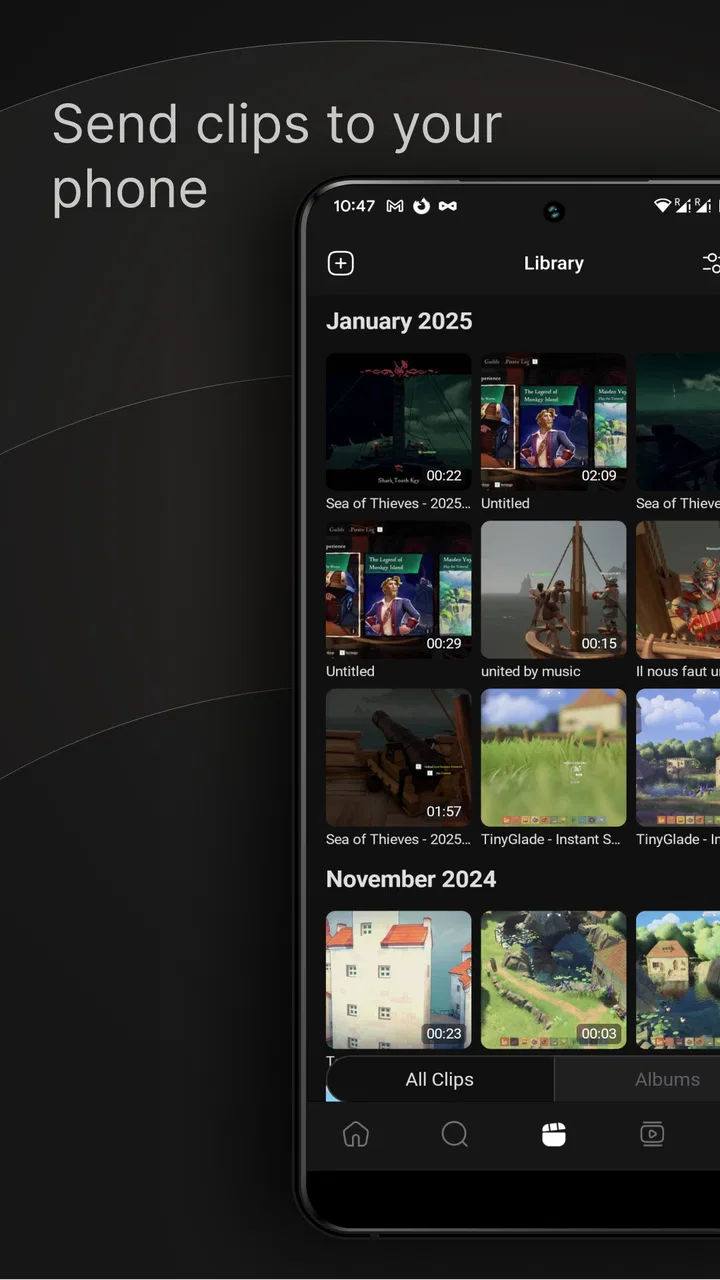
Developed by Medal B.V., this free social app sits in a useful middle ground. It lets me watch, edit, upload, and share gaming footage, while also giving clips a community setting instead of leaving them buried in my phone’s gallery. The experience is aimed at teenagers and older users, with a Teen content rating, and the app has grown to more than a million installs. Its current version is 6.4.0, and it runs on Android 8.0 or later.
My overall impression is positive, but only if I approach it with the right expectations. Medal is strongest when I already know what I want to capture and have a repeatable habit for sorting or sharing it. It is less convincing if I expect polished, long-form editing, a completely distraction-free gallery, or the same depth as a dedicated desktop recording tool. The difference comes down to workflow: this is a clip-focused social utility, not an all-purpose production studio.
You May Also Like

 Blood Strike: 2.5 Anniversary
Blood Strike’s Loadouts Turn Every Drop Into a Tactical Gamble
A close look at Blood Strike’s custom loadouts: how fast access to signature weapons reshapes its battle royale rhythm, rewards preparation, and narrows the gap between fights.

 Pandora - Music & Podcasts
Pandora’s Music Is Easy to Start, but Harder to Recover
Pandora’s strength is its low-effort path from a seed to a station. Its weak spot is how much confidence it asks you to place in connection, setup, and quiet recovery.

 8 Ball Pool
 Is Built on Rivalries, Rematches, and Routine
A close look at the rivalries, rematches, shared routines, and unanswered safety questions that turn a quick pool match into a persistent mobile community.

 Samsung Music
’s Quiet Strength Is Playing What You Already Own
Its reach comes less from spectacle than from dependable access to a personal library. That simplicity is both the app’s strongest retention engine and its ceiling.

 AccuWeather: Weather Radar
AccuWeather Review: A Quick, Clear Forecast for Everyday Decisions
For everyday plans, the best forecast is the one you can understand quickly. AccuWeather makes rain timing, radar, and local conditions easy to act on, with a few trade-offs.

 Hill Climb Racing
Why Hill Climb Racing Still Turns Crashes Into One More Run
A tiny car, a bumpy hill and one more upgrade: Hill Climb Racing keeps resurfacing because its simple chaos makes every near-miss feel personal.
More From Our News Desk
View All News


How I use Medal from a gaming moment to a shareable clip
I focus on the handoff between saving a moment and deciding what to do with it, since that is where a quick clip can become a useful memory—or just another file. A brief review before sharing helps me catch confusing context and details I would rather keep private. Next, I look at the checks that make this routine more dependable.
The baseline workflow is quick, but preparation matters
My most reliable routine starts before I play. I decide what kind of material I am likely to save: a short competitive play, a funny voice-chat moment, a useful tutorial example, or a sequence I may want to revisit later. That small decision changes how I treat the app. If I save everything, the collection becomes noisy. If I save only moments that have a clear purpose, browsing and sharing become much easier.
Once a clip is available, I use the viewing stage to check whether the moment actually works outside the game. A highlight that felt exciting during a match can look confusing when watched without context. I pay attention to the first few seconds, the visibility of the important action, and whether the ending arrives too late. This is where Medal is more useful than simply keeping raw recordings in a gallery: the clip is being considered as something another person might watch.
Editing is most effective when I keep it restrained. I usually remove dead time before the action and unnecessary seconds after it. For a short gaming highlight, that basic trim often improves the result more than adding lots of effects. I also watch the clip once with the sound in mind. Game audio can explain what happened, but it can also overpower speech or make a funny moment difficult to understand. A clip that looks good but sounds messy is not ready to share.
The upload step works best when I treat the title or description as useful context rather than decoration. I try to identify the game situation, the surprising part, or the reason someone should watch. That makes a collection easier to search mentally later and gives viewers a reason to stop scrolling. Medal’s social side matters here: a clip is not only a file I store, but also a small piece of gaming content presented to other people.
Where it fits better than ordinary phone storage
A normal gallery is fine for keeping a recording, but it does not naturally encourage a highlight workflow. Clips sit beside screenshots, camera photos, downloads, and unrelated videos. Medal gives gaming footage a more focused place, which is valuable when I am building a personal archive of plays or collecting examples for friends.
It is also more convenient than sending every clip through a messaging app. Messaging is excellent for a single private share, but repeated sharing can create duplicate files, compressed videos, and conversations where the clip becomes hard to find. Medal is better suited to a continuing stream of gaming moments, especially when I want to watch them again or show them to people who follow the same interests.
Compared with a long-form video platform, the advantage is immediacy. I do not need to turn a short moment into a complete episode with an elaborate introduction and ending. That makes the app a good match for quick reactions, compact plays, and informal highlights. The trade-off is that it does not replace the planning, editing control, or presentation options I would expect when making a polished gaming video.
Settings I check before relying on the app
I would not begin by uploading a large batch of recordings and only then think about organization. I first look through the available capture, upload, and sharing choices that appear in my version of the app. The exact options can depend on the device and the way the footage was created, so I prefer testing with a short, unimportant clip. That confirms the basic path from recording to editing without risking a favorite moment.
One useful habit is checking how the clip looks in portrait and landscape viewing before sharing it widely. Gaming footage often comes from a wider screen, while phone users may encounter it in a feed designed for quick browsing. If important information sits at the edge of the frame, the clip may be technically complete but practically difficult to watch. I avoid aggressive cropping unless the action remains clear after the change.
I also review sharing choices with more care than I did when I first installed the app. A clip can be harmless to me but reveal a username, a private conversation, or information visible in a game interface. Before publishing, I watch the entire video rather than judging only the highlight. This is one of the most important Medal habits because the editing screen encourages attention on the action, while the surrounding details may be noticed only after uploading.
Notifications are another area worth controlling. A social clip app can become distracting if every reaction pulls me back into the phone while I am playing. I prefer a setup that lets me review activity when I choose, instead of interrupting a match or a work session. For someone who mainly wants a personal clip archive, reducing social interruptions can make the app feel more like a useful tool and less like another feed demanding attention.
The app is free to install, but it includes in-app purchases ranging from $9.99 to $179.99 per item. I would not assume that paying is necessary for the basic idea of saving and sharing clips. I would first use the free experience long enough to discover what is actually slowing me down. If my needs are limited to occasional highlights, a purchase may add little. If I use Medal heavily, I would judge any paid option by whether it removes a real workflow problem rather than by the promise of having more features in theory.
Small habits that make frequent sharing faster
The biggest speed improvement comes from deciding what deserves attention before the session starts. I keep a simple mental rule: save moments that are impressive, funny, useful, or worth discussing. That prevents the common mistake of turning every ordinary victory into another file. The result is a smaller collection, but it is much more enjoyable to browse and easier to share with friends.
I also separate capture from publishing. During a match, I do not stop to write a perfect description or decide whether a clip belongs in a public feed. I save the moment and return to it later. During a short review session, I remove weak clips, trim the promising ones, and add context. This two-stage pattern protects concentration during play and makes the editing process more deliberate.
For repeated content, I use consistent naming ideas rather than trying to be clever every time. A short label describing the situation helps me recognize a clip weeks later. This is particularly useful when I save several moments from the same game or session. The benefit is not flashy, but it turns Medal from a pile of highlights into a usable personal record.
Another effective pattern is making a short “send later” group in my own routine. When I am playing with friends, I save clips without immediately interrupting the conversation. After the session, I review only those moments and share the best ones together. This avoids flooding a chat with near-identical videos and gives me a chance to remove clips containing side conversations or accidental background details.
I find the app more valuable when I use it for learning as well as showing off. After a competitive session, I can review a short play and ask what made it work: positioning, timing, awareness, or an opponent’s mistake. A clip can then become a compact reminder for the next session. That use is easy to miss because social feeds encourage instant sharing, but it gives the archive lasting value.
What experienced users should not expect from it
Medal’s clip-first design has clear limits. I would not choose it as my main tool for a long commentary video, a multi-part montage, or a project that needs detailed control over several audio and video layers. A dedicated editor is better when precise pacing, complex transitions, extensive sound work, or a carefully planned narrative matters more than speed.
I also would not rely on it as the only copy of an important recording. Social apps are convenient places to organize and share content, but my most valuable clips deserve a separate personal backup. That is not a criticism unique to Medal; it is simply a sensible distinction between a sharing workflow and an archive strategy. If a clip matters for a tournament memory, a personal project, or a channel, I keep the original somewhere I control.
The social feed can be useful, but it may not suit someone who wants a quiet utility with no community element. Browsing other people’s gaming clips can inspire ideas and help me discover entertaining moments, yet it can also pull attention away from the clips I intended to manage. Users who dislike feeds, reactions, or public sharing may prefer a straightforward recorder and local file manager.
There is also a quality trade-off between convenience and control. A fast mobile workflow is attractive because it reduces friction, but the final result still depends on the source recording, the device, the game, and the way the clip is displayed. I do not expect a quick trim to fix poor framing, unclear audio, or a moment that needs more explanation. Medal can make a good clip easier to handle; it cannot make an uninteresting recording compelling.
Who will get the most from Medal?
I recommend it to players who regularly capture short highlights and want one focused place to review, edit, and share them. It is especially suitable for friends who exchange gaming moments, competitive players who want a lightweight review habit, and casual creators who prefer short clips over long videos. The free entry point makes it easy to test whether that workflow fits without committing to a larger editing setup.
It is also a good choice for someone who has outgrown random screen recordings but does not yet need a professional production process. Medal adds structure without demanding that every clip become a finished show. That balance is its strongest quality. I can use it casually after a good session, then become more systematic if I start building a recognizable collection.
I would steer other users elsewhere. If the priority is private storage with minimal social activity, a local gallery or cloud drive may feel cleaner. If the goal is a polished channel with long episodes, a desktop recorder and full editor will offer more control. If a user has an older device, limited storage, or a connection that makes video handling frustrating, the convenience of the app may not outweigh the practical limitations of mobile clip management.
How the rating and cost fit my experience
Medal holds a 4.0 average from around 9.7 thousand ratings, with more than 423 written reviews. I read that as a sign of a generally useful app with room for individual frustrations, rather than as proof that every phone and gaming setup will behave identically. Clip tools are unusually sensitive to device performance, recording sources, file sizes, and personal expectations, so I place more weight on whether the workflow fits my habits than on the score alone.
The app is free, which lowers the risk of trying it, but the presence of purchases means I would avoid upgrading impulsively. My approach is to use the basic workflow through several real gaming sessions first. If I still find myself saving clips, reviewing them, and sharing them, then I can decide whether a paid item solves a specific problem. If I stop using the app after the novelty fades, spending more would not improve the habit.
My verdict after building a repeatable routine
Medal works best when it becomes part of a simple repeatable loop: capture selectively, review later, trim hard, check the full frame, and share with context. That loop is more important than any single editing action. It keeps the app focused on useful moments and prevents the collection from becoming an unmanageable stream of raw footage.
I like that the app makes gaming clips feel more intentional without forcing me into the demands of long-form content creation. Its social category is relevant because sharing is central to the experience, but I can still get value from it as a personal highlight library and a lightweight review tool. The strongest users will be the ones who set boundaries around notifications, protect private details, and treat publishing as a second step rather than an interruption to play.
My final recommendation is straightforward: try it if your gaming life produces short moments you genuinely want to revisit or send to friends. Skip it if you need a silent storage app, advanced production controls, or a guaranteed replacement for a dedicated recording setup. For the right user, Medal turns scattered gaming highlights into a faster, more social routine. For everyone else, its extra feed and workflow may be more than they need.
FAQs for Medal - Gaming Clips
01What is Medal - Gaming Clips used for?
Medal - Gaming Clips is an app designed for gamers to easily capture, edit, and share their gaming highlights. It allows users to save memorable moments from their gameplay and share them with friends or on social media platforms. The app supports various games and provides a community for gamers to connect and explore content.
02Is Medal - Gaming Clips free to use?
Yes, Medal - Gaming Clips is free to download and use. However, it offers in-app purchases and premium features that enhance the user experience. These might include additional editing tools, cloud storage options, or advanced sharing capabilities. Users can enjoy most functionalities without any cost.
03How do I capture gameplay using Medal?
To capture gameplay, Medal provides an easy-to-use recording feature. Once installed, users can start a recording session by pressing a hotkey or using the app’s interface. The app records the screen, allowing users to capture specific moments during gameplay. After recording, clips can be edited and shared directly from the app.
04What platforms are supported by Medal?
Medal is available on both Android and iOS, as well as PC. It supports a wide range of games, from popular titles to indie games. The app regularly updates to include more games and features, ensuring compatibility and a seamless user experience across different platforms and devices.
05Is it possible to edit clips within the app?
Yes, Medal provides a built-in editor where users can trim, add effects, and enhance their clips. The editing tools are user-friendly, allowing both beginners and experienced users to personalize their gaming highlights. This makes it easy to create professional-looking videos directly within the app before sharing them.
Pros
- User-friendly interface for easy navigation.
- High-quality video capture and editing tools.
- Seamless sharing to social media platforms.
- Supports a wide range of games.
- Free to use with optional premium features.
Cons
- Occasional bugs during video editing.
- Some features require a stable internet connection.
- Ads can be intrusive in the free version.
- Limited customer support response time.
- In-app purchases can be costly.

Medal - Gaming Clips
Gallery